Using the Base layer in Digs
Written By JSB (Jason Brown)
Last updated 2 months ago
What is Base Layer?
Interestingly, Digs has always had a "base layer". This has been a default storage location for annotations, drawings, comments, and measurements that were added before any named layer was created. The catch was that it had no interface. You could not see it in your layer list, easily manipulate it’s contents, or choose to exclude it from an export.
That changed with the most recent updates.. Digs automatically adds a visible Base layer to every document. The data that was always there is still there, it just finally has a home you can actually work with.
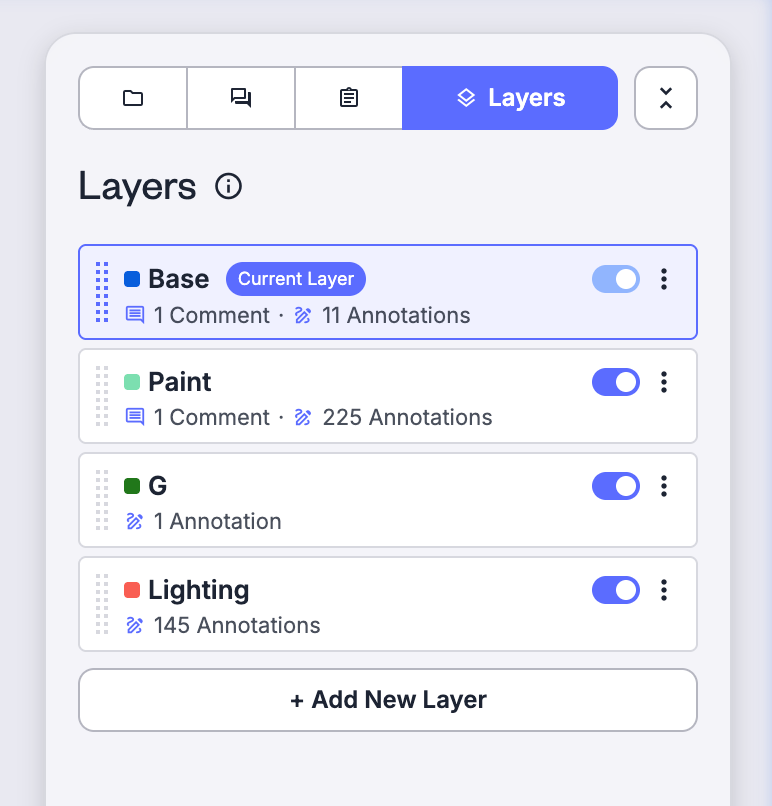
What changed
Before: Annotations and comments placed without an active layer were stored silently in the background. There was no way to:
See them as a distinct layer
Easily identify Base annotations for move to more appropriate layers (like Plumbing or Electrical)
Exclude them from a floor plan export
Now: Base layer appears in your layer list. You can:
Ability to move Base to best priority location
Top of the list makes it the current layer
At the bottom it is lowest priority and only ‘Current’ when all other layers are off.
Cut and Paste Annotations from base layer to “Current” layer.
Choose whether to include it when exporting a document
How Current Layer works
Digs always places new annotations on the current layer, always the topmost active layer in your list.
If Plumbing is on and at the top, new annotations go to Plumbing.
If you turn Plumbing off, the next active layer becomes current and takes new annotations.
If all named layers are off, annotations still need somewhere to go. That place is Base.
This behavior has not changed. Base layer is simply now visible in the list so the logic is no longer invisible.
Default state
Base layer is ALWAYS ON for all documents. You do not need to enable it manually.
Known issue on launch: A small number of users have reported that Base layer appeared toggled off the first time they opened a document after this update. If that happens, turn it on once. It will stay on for all future document updates. This is believed to be a one time toggle due to the migration of old files to the new way of working.
Hiding Base Layer
Base Layer cannot be hidden. All data on the Base layer should be expected to always be visible. The only exception to this rule is in the case of Exporting documents.
Base layer needs to exist in oder to retain that default location for annotations, so no data gets lost or misplaced. Digs is always open to feedback and we would love to hear your use case though, maybe this is something that needs more finesse. Your workflow could be the key to unlocking that.
Exporting without Base Layer
As mentioned above, export is the only place where Base layer can be hidden entirely. When generating a floor plan export or document revision for field use, you can now deselect Base layer from the export. Any markup stored there will not appear in the exported file.
This is useful when:
You want a clean working copy for a trade without background annotations
You are sharing a specific-discipline view and the base markup would create noise
Moving items from Base Layer to another layer
If you have existing annotations sitting on Base that belong somewhere more specific, you can move them to another layer. Hiughlight one or more items, copy or cut the data from the Base layer, and then paste it to the layer you ant it to love going forward. If you copy, remember to remove the original annotations so you do not have duplicates.
Frequently asked questions
Will this affect documents I already have? Yes. Digs has retroactively added Base layer to all existing documents. Nothing has been deleted or moved. The data that was previously unmanaged is now visible under the Base layer name.
Can I rename or delete Base layer? No. Base is a system layer. It cannot be renamed or removed. You can change the default color for it though if you need to for visual purposes
What if I had no annotations before? Will Base layer be empty? If no annotations, comments, or drawings were ever added outside of a named layer, Base layer will be empty. It will still appear in your layer list.
What if I do not need the base layer? It will always be there, we suggest dragging it to the bottom where you will interact with it less. It will still work the same, if you turn off layers, it will still be there to catch all of the annotations and comments until you reactivate a layer with higher priority.