Managing Admin Access to DigsCare (Warranty Access)
Written By JSB (Jason Brown)
Last updated 8 months ago
DigsCare Warranty access is now optional for Admins.
If you have more than one Admin, or If Admins are not involved in daily activities, you can now opt out of Warranty tools access to diminish Service notifications and interruptions.
Historically, all Workspace Admins were automatically included in Warranty access. This meant Admins received warranty-related notifications and had full visibility into the Warranty Dashboard by default.
We’ve updated this behavior to give Admins more control.
What Changed?
For new accounts, Admins are now defaulted to “Warranty Access: Off.”
Admins can opt in at any time if they need:
Temporary visibility into warranty activity
Ongoing participation in the Warranty Dashboard
Access to ticket workflows
This allows leadership and operational Admins to stay focused unless warranty visibility is needed.
What About Existing Admins?
We did not modify any current account settings.
If an Admin previously had Warranty access, that setting remains unchanged. Existing Admins would need to manually turn access off if they no longer want to participate in warranty workflows.
How to Opt In or Out of Warranty Access
Admins can control their Warranty access at any time.
Click your Profile icon in the top right
Select Workspace Settings
Go to Users
Find your name in the list
Toggle Warranty Access to Yes or No
Changes take effect immediately.
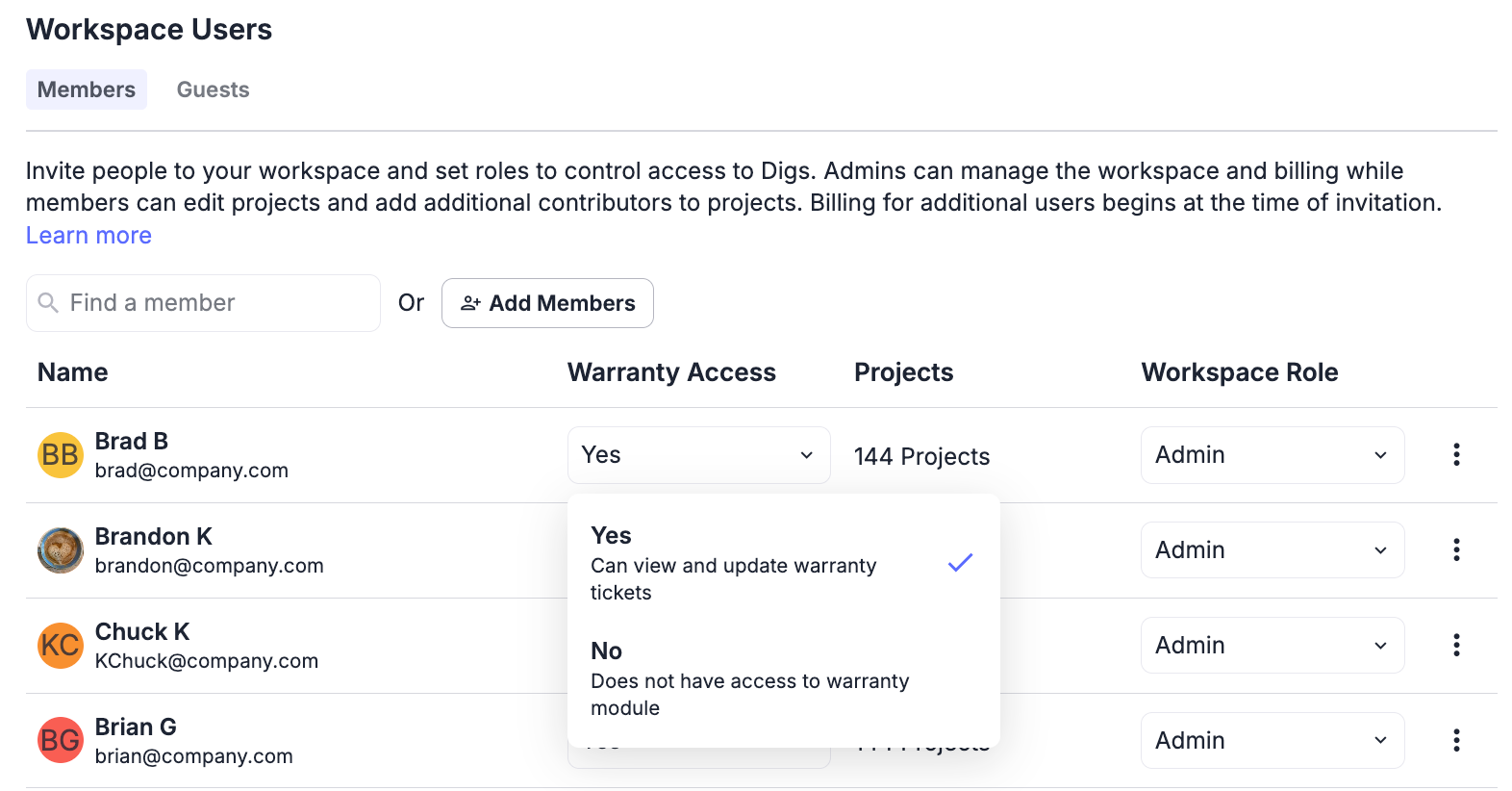
What Happens When Warranty Access Is Turned Off?
If an Admin turns off Warranty Access:
They will stop receiving warranty-related email notifications
The Warranty Dashboard will no longer be visible
Warranty-specific tools and ticket workflows will be hidden
This does not impact their Admin role within the Workspace. It only removes access to DigsCare Warranty tools.
Why now?
Digs is constantly listening to our customers and issues experienced. When we started DigsCare, Admins were ofte n a Key component of Day to Day use.
As teams grew, it become apparent to us and our users that not every Admin needs to be involved in day-to-day warranty operations.
This update allows Admins to:
Reduce inbox noise
Maintain better work boundaries
Opt in when needed/requested
Step back when not needed (the piece that needed to be added)
Was this helpful?
Still need help? Ask the team