Using Limited Collaborators and Titles together efficiently
Written By JSB (Jason Brown)
Last updated About 2 months ago
Digs recently added two features for managing who's on a project and what they can see: Titles and Limited Collaborators. They're built separately and don't depend on each other, but most Project Managers will find they work best used together. This article covers what each one does and how to use them side by side.
The use case
Projects often end up with a long list of users attached to them: subcontractors, vendors, the homeowner, sometimes people from the builder's side who only need visibility into one piece of work. Two problems come up as that list grows.
First, it gets hard to tell who's who. A list of names alone doesn't tell you that one person is the electrician and another is the homeowner's cousin who got added by mistake.
Second, most of those users don't need to see everything happening on the project. A plumber doesn't need visibility into a conversation about the roofing timeline.
Titles solve the first problem. Limited Collaborators can help solve the second.
What is a Limited Collaborator?
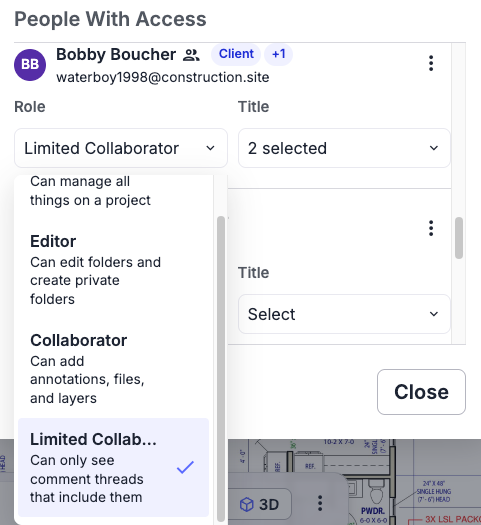
A Limited Collaborator has the same permissions as a standard Collaborator. They can participate in the project fully: upload files, add Comments, complete Tasks. Nothing about what they're allowed to do changes.
What changes is default visibility. A Limited Collaborator only sees a Comment or Task if they're assigned to it, or if they're @mentioned in the thread. Everything else on the project stays out of view.
To use it: update a project user's role to Limited Collaborator when they don't need to see every Comment and Task on the project, just the ones that involve them.
What are Titles?
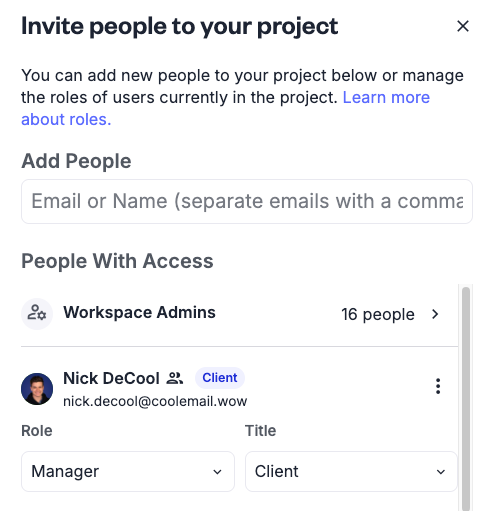
A Title is a label you apply to a user on a project, like Electrician, Site Super, or Client. Titles don't carry any technical permissions and don't restrict what a user can see or do. They exist to make the user list on a project easy to scan at a glance.
To use it: apply a Title to each user as they're added to a project, so their role is visible without anyone having to guess.
How they work together
Titles and Limited Collaborators are separate settings. You can use either one without the other. But they're designed to pair well in practice.
The clearest example is managing private folder access. When you're adding users to a private folder, Titles make it easy to spot who should be excluded. If a user's Title reads "Client," that's visible right in the selection list, so you can skip over them without having to remember who each name belongs to. The Title itself doesn't block or grant folder access; it just makes the right choice obvious while you're doing it manually.
The same logic applies to Limited Collaborators. Once every user on a project has a Title, it's much faster to look at the list and decide who genuinely needs full visibility into Comments and Tasks, and who should be switched to Limited Collaborator instead.
When you are @mentioning in a thread, you can easily see the Title of the user and make an informed decision if they should be included
Frequently asked questions
Does switching a user to Limited Collaborator take away any of their permissions? No. A Limited Collaborator can do everything a standard Collaborator can do. Only their default visibility into Comments and Tasks changes.
If that user had previously responded to a Comment, be aware they are viewed as a participant and would still retain access to that thread.
What exactly can a Limited Collaborator see? A Comment or Task if they're assigned to it, or if they're @mentioned in the thread. Anything else on the project stays visible as it would for a regular Collaborator.
Do I need to set a Title before I can make someone a Limited Collaborator? No. The two features are independent. Titles just make it easier to decide who should be a Limited Collaborator; they're not required to set one.
Does applying a Title change what a user can access? No. Titles carry no permissions. They're a label only, meant to help you identify users quickly when managing access elsewhere, like private folders or roles.
Can I remove or change a user's Title later? Yes. Titles can be updated at any time and don't affect any existing project activity or permissions when changed.
If a Limited Collaborator is @mentioned in a Comment, do they get notified? Yes. Being assigned or @mentioned is what gives a Limited Collaborator visibility into that thread in the first place, so they're notified the same way any other user would be.
Can I add my own Titles or custom Titles? Not yet. We have a desire to allow for this, and to make grouping of users easier for example mentioning Roofers making all roofers aware of something. We are collecting feedback for this feature.
How does Limited Collaborator work with Handed of projects? Great question! We have a whole section for that.
See: How comment and task data transfers during a homeowner handoff